A mobile gateway for Java-based gaming
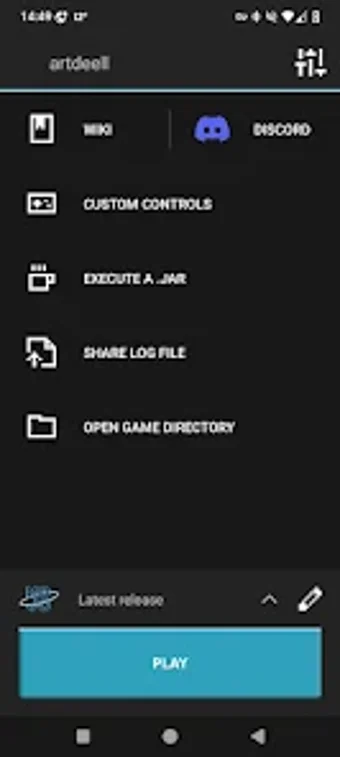
MojoLauncher, developed by artdeell, serves as a specialized compatibility layer designed to provide an environment where users can execute a full desktop game on their mobile devices by translating desktop Java commands into a format that mobile graphics drivers and processors can interpret, allowing for a level of gameplay depth typically reserved for desktops.
Top Recommended Alternative

Engine customization and sandbox simulations
The launcher includes the ability to manage the Lightweight Java Game Library (LWJGL) and various Java Runtime Environments (JRE) within a mobile framework. It offers multiple Renderer options, such as Holy GL4ES or Zinc, which users can toggle to match their specific hardware capabilities. This flexibility allows the launcher to support a wide range of devices, though performance is significantly dictated by the device’s chip architecture.
Running a resource-intensive desktop application on a mobile processor creates high hardware demands. While MojoLauncher can operate on devices with limited memory, a stable and fluid experience generally requires at least 4GB of RAM and modern graphics support. Additionally, users are expected to run into technical difficulties, as troubleshooting crashes and managing memory heaps may be difficult for those that are not technically knowledgeable.
Interface versatility and control mapping
One of the launcher’s most practical features is its highly customizable touch-control system. Since desktop games are designed for keyboard and mouse inputs, the launcher provides a virtual terminal where users can map complex key combinations to on-screen buttons. These configurations can be saved, exported, and shared, ensuring that players can tailor their interaction style to fit specific screen sizes. Additionally, MojoLauncher includes native support for external gamepads and physical peripherals, allowing for a desktop-like control scheme when connected via Bluetooth or USB.
A dedicated tool for sandbox gaming sessions
MojoLauncher offers a level of modding and customization that exceeds the scope of native mobile editions. It supports the installation of complex mod loaders, enabling a vast ecosystem of community-created content. While the initial setup can be technically demanding and requires a basic understanding of file management and memory allocation, the tool provides access to a portable and fully-featured sandbox environment.